
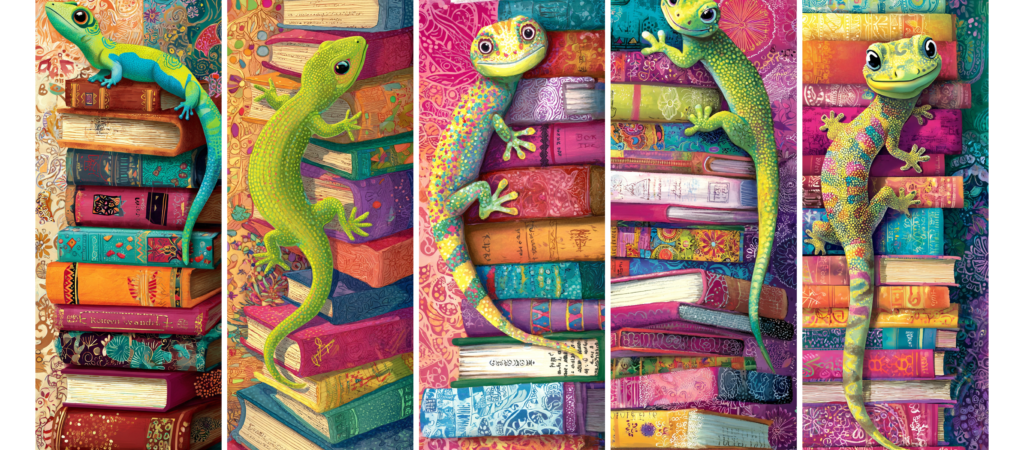
These whimsical gecko bookmarks are a delightful addition to any reading material. Measuring 2″x6″, each bookmark features vibrant colors and unique designs that showcase the charm of these playful reptiles. The set includes five different styles, each with its own distinctive flair, ensuring that there’s a bookmark to suit every reader’s personality. Perfect for marking your place in a book or as a thoughtful gift for a friend, these bookmarks combine functionality with a fun artistic touch. Available as a free PDF download. Personal Use Only.

Step-by-Step Tutorial for Printing Gecko Bookmarks
Materials Needed:
- Canon Matte Photo Paper
- Printer (compatible with Canon Matte Photo Paper)
- Computer with the bookmark file downloaded
- Paper trimmer (for precise cuts)
- Ruler (optional, for guiding cuts)
- Pencil (for markings, optional)
Printing Instructions:
- Prepare Your Printer:
- Ensure that your Canon printer has enough ink and is in good working condition.
- Load the Canon Matte Photo Paper into the printer tray, making sure the matte side is facing the correct direction. Refer to your printer’s manual for specific loading instructions.
- Download and Open the Bookmark File:
- Download the gecko bookmarks file from the provided link.
- Open the file using your preferred image viewer or editing software.
- Configure Print Settings:
- In the print settings, select “High Quality” or “Best” for printing to ensure vibrant colors.
- Set the paper type to “Matte Photo Paper” to match the paper you are using.
- Adjust the print size to 100% to maintain the original dimensions of the bookmarks.
- Print the Bookmarks:
- Once the settings are configured, click “Print”.
- Allow the bookmarks to print completely before handling them to avoid smudging.
- Prepare for Cutting:
- After printing, allow the ink to dry for a couple of minutes.
- Lay the printed sheet on a flat surface to prepare for cutting.
- Measure and Mark:
- As a guide for cutting, you can use a ruler and pencil to lightly mark where you need to cut. Each bookmark should be 2″x6″.
- Ensure your markings are even to maintain straight cuts.
- Cut the Bookmarks:
- Using a paper trimmer, align the edges of the printed sheet with the cutting guide for straight cuts.
- Slice along the marked lines to separate each bookmark accurately.
- Final Touches:
- After cutting, check for any rough edges. If needed, lightly trim any uneven edges with scissors for a polished finish.
- Your gecko bookmarks are now ready to be enjoyed or gifted!
Enjoy your newly printed bookmarks as you dive into your next reading adventure!